The security audit is finished. The findings are logged, the urgent fixes have owners, and everyone gets back to work.
Then someone changes a firewall rule. A new vendor gets access. An administrator leaves.
Any of those changes could affect the decisions made during the assessment. Who checks whether the protections still work? Who decides whether a new weakness needs attention? And where does that decision get recorded?
NIST's Risk Management Framework gives organizations a way to keep answering those questions. It's widely used in government, but there's plenty here that a private company can use too.
So what is RMF?
The National Institute of Standards and Technology, or NIST, describes the Risk Management Framework in Special Publication 800-37 Revision 2. It covers security and privacy risks throughout a system's life. This introduction focuses mainly on security examples.
RMF has seven steps:
Prepare → Categorize → Select → Implement → Assess → Authorize → Monitor
Together, they help you understand a system, choose suitable protections, check whether those protections work, and make an informed decision about the risk that remains. When the system changes, you revisit the parts of that decision that need another look.
You don't need to finish one perfect cycle before learning anything useful. Assessment findings can send you back to implementation; a major change can prompt a fresh look at your controls or impact assessment.
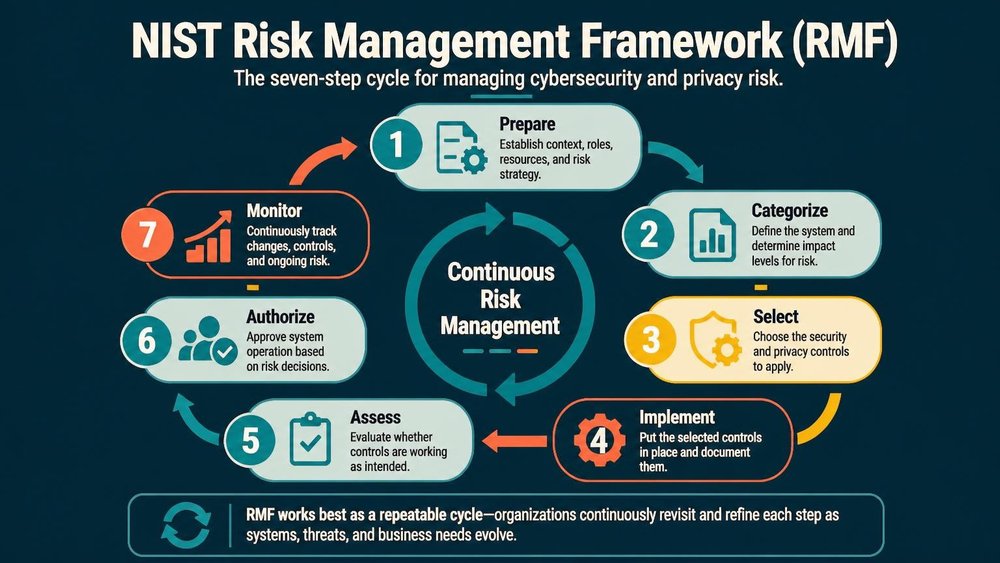
The steps give you a repeatable way to review risks as systems and business needs change.
The seven steps in plain English
For a simple example, imagine a company reviewing its employee portal, where people download pay statements and update personal details. We'll follow that portal through the steps.
1. Prepare: work out who's responsible
Start with the people and the purpose. What does the system do? Who owns it? Who runs it? Who has the authority to accept its risks?
For the employee portal, HR might own the service while IT operates it. Someone also needs responsibility for deciding whether the remaining risk is acceptable. Getting those names agreed early saves a lot of confusion when an assessment turns up a problem.
Look at what the organization already provides, too. The portal may use shared sign-in, logging, incident response, and physical security. Find out which protections it can rely on and what evidence supports them. Every team shouldn't have to rebuild the same controls, but each team needs to understand what those controls cover.
2. Categorize: understand what could go wrong
RMF asks you to consider the impact of losing confidentiality, integrity, or availability. In everyday terms: what happens if information leaks, gets changed improperly, or becomes unavailable?
For the portal, exposed pay statements could harm employees. Unauthorized changes to payment details could lead to fraud. An outage might be inconvenient on an ordinary afternoon and much more serious near a payroll deadline.
Those consequences help establish how much protection the system needs. In formal RMF work, categorization follows defined methods; it's more than choosing a color on a risk matrix.
Privacy needs attention as well. Think about what employee information the portal collects, who can use it, and whether that use could cause harm, even without a security breach.
3. Select: choose protections that fit
Once you understand the impact, choose the controls the system needs. NIST's SP 800-53 is a catalog of security and privacy controls covering areas such as access, logging, incident response, training, and configuration management. Federal starting baselines are published separately in SP 800-53B, along with guidance for tailoring them.
For the portal, your choices might include multi-factor authentication for administrators, limits on who can change payment details, and alerts for sensitive account changes.
The work here is to choose and justify an appropriate set of protections. A long control list is only useful if it addresses the system's actual needs.
4. Implement: put the controls to work
Now someone has to configure, document, and operate those protections.
Buying a logging tool leaves plenty of work to do. You still need to choose what gets logged, protect the records, decide who reviews alerts, and agree on what happens when something looks wrong.
For the portal, that could mean configuring administrator MFA, checking access permissions, and making sure changes to payment details appear in the logs. Document how those controls work so another person can maintain or assess them later.
Some controls depend on procedures or training rather than software. An account-removal process still needs someone to tell IT when an employee leaves.
5. Assess: check whether the controls work
An assessor examines the controls and the evidence behind them. Depending on the control, that might involve reviewing settings, interviewing staff, examining records, or performing tests.
Suppose the portal assessment finds that most administrators use MFA, but two legacy accounts can still sign in without it. You now have a specific finding to investigate and fix.
Formal RMF programs use a Plan of Action and Milestones, often shortened to POA&M, to track weaknesses and planned remediation. The practical lesson is straightforward: record the problem, give the work an owner, and track its progress and deadlines. An assessment report sitting in a folder won't fix either account.
6. Authorize: make the risk decision explicit
Someone with the right authority reviews the evidence and decides whether the remaining risk is acceptable. In formal RMF, this is the Authorizing Official, who takes responsibility for the authorization decision.
For the portal, a decision-maker would need to understand the two account exceptions: what those accounts can do, what protections limit their exposure, and how long the fix will take. The answer could be to proceed under defined conditions, require changes first, or decline to authorize operation.
Security staff provide the evidence and recommendations. The person authorized to make the decision has to weigh the risk against the organization's needs and record the reasoning. Silence or an unanswered email shouldn't become the approval process.
7. Monitor: keep checking what changes
After authorization, the system keeps changing. New accounts appear, software gets updated, and vulnerabilities are discovered.
Monitoring helps you work out whether those changes affect the earlier decision. Some evidence comes from scanners, logs, and configuration checks. People still need to review the results, investigate changes, and decide what needs action.
For the portal, you'd check that the account exceptions were resolved and watch for new privileged accounts or changes to authentication settings. A major change might need a fresh assessment or authorization decision.
The useful question is: do we have enough current information to know whether the risk is still acceptable?
And where does NIST CSF fit?
You may also know NIST's Cybersecurity Framework, or CSF. Its name is similar, but you don't have to choose between the two.
CSF helps an organization describe the cybersecurity outcomes it wants. CSF 2.0 groups those outcomes under Govern, Identify, Protect, Detect, Respond, and Recover.
RMF gives you a structured process for managing security and privacy risks across systems and their lifecycles. You can use CSF to discuss priorities across the organization and RMF to organize the assessment and risk decisions for a particular system. The two approaches complement each other.
What can a smaller team use?
A team borrowing ideas from RMF can start with one important system and a few questions:
- What does the system do, and who depends on it?
- Who owns it, and who can accept its risks?
- Which controls are we relying on, and what evidence says they work?
- What still needs fixing, who is doing it, and when is it due?
- What changes should trigger another review?
Try answering those questions for a system you know. You'll probably find some good practices already in place, along with a few gaps where the answer lives in someone's head.
This exercise can be useful without being a formal RMF implementation. If your organization needs formal adoption, follow the applicable requirements for roles, assessments, documentation, and authorization.
Three habits are especially useful even in a small team: name the person making each risk decision, reuse controls where they apply, and keep the supporting evidence current. Those habits also make it easier to explain decisions when a customer, auditor, or new colleague asks about them.
Where RiskVault fits
Tracking this work gets harder when the assessment is in one folder, the fixes are in tickets, and the acceptance decision is buried in email.
RiskVault helps keep those records and handoffs together. You can link risks to affected assets, assign owners, attach evidence, and send treatment plans or risk-acceptance proposals for approval. With the relevant catalog and frameworks selected, your controls can carry mappings to NIST SP 800-53 requirements. After treatment, you can record an effectiveness review, assess the risk that's left, and set the next review date. That supports the coordination and recordkeeping behind several RMF steps. Your team still implements and tests the controls, runs technical monitoring, and makes any formal authorization decision; approving a risk in RiskVault doesn't grant a federal authorization to operate.
One question to take back to your team
Pick a system your business depends on. If its configuration changed tomorrow, who would notice, and who would decide whether the remaining risk was still acceptable?
If you can answer that and show the evidence, you've already got something useful to build on.
Further reading
- NIST SP 800-37 Rev. 2: the RMF process, roles, and activities.
- NIST SP 800-39: managing information security risk across an organization.
- NIST SP 800-53 Rev. 5: the security and privacy control catalog.
- NIST SP 800-53B: control baselines and tailoring guidance.
- NIST Cybersecurity Framework: resources for describing and improving cybersecurity outcomes.